Showing posts with label sql. Show all posts

Wednesday, November 21, 2012

Accessing Enum Labels from Outside AX 2012

Oh, I've done it again.  I've cracked some binary sequence of metadata goodness.  All of you switching over to AX have probably noticed that Enum labels are not accessible as they were in 4.0 and 2009.  In another blog post of mine, I described a solution to accessing Enums in 4.0 and 2009.  I think that method may still work in 2012, but I don't like the idea of always updating your model (not to be confused with the new kind of Models in 2012...oh, the ambiguity) every time you make a change to an Enum.

As you know, AOD files no longer exist in 2012, which stored all the metadata for all AOT objects.  Instead, the metadata is now stored in a model database.  The beauty of it is that we can now simply run queries to view this metadata from outside AX.  However, you will run into a brick wall when trying to view Enum data.  You will only see records for the BaseEnum object, not the Enums beneath it.

Upon further research, I found a field called Properties in the ModelEntityData table.  It is a binary field in which I would later on find that the Enums are stored within this binary structure.

If you want to hear about the technical structure of this Properties field, please read on.  Otherwise, skip to the solution below.

So, I began from the beginning.  I created a new BaseEnum in the AOT and made small tweaks to it to see how the Properties field changes throughout.  Below, you will find a chart that shows both the binary data and the action I took that got it there.  The below chart is a condensed version (so it could fit on this blog) that I made up that disregards changes in ConfigurationKey and CountryRegionCode properties, as those took up a lot of space.  I also kept string sizes small, as this impacted the length of the data as well.  The real chart I used can be found here.

  1    2  Label    H CC FLAG   CK 3  4  5  EnumLabel(SAS)---| EnumName(SAS)--------| 6    ECK CC   ECC(SAS)-----| ChangeDetails
---------------------------------------------------------------------------------------------------------------------------------------------------
0x0600 01               100204       00 00 0000               0000                            0000                --new enum, no props
0x0600 01               100004       00 00 0000               0000                            0000                --useenumvalue=yes
0x0600 02 5A000000      100204       00 00 0000               0000                            0000                --useenumvalue=no label=Z
0x0600 02 5A000000      000204       05 00 0000               0000                            0000                --displaylength=5
0x0600 02 5A000000      000204       00 00 0000               0000                            0000                --displaylength=0
0x0600 02 5A000000      200204       00 00 0000               0000                            0000                --style=radio
0x0600 02 5A000000      300204       00 00 0000               0000                            0000                --displaylength=auto
0x0600 02 5A000000      300206    02 00 00 0000               0000                            0000                --analysisusage=attribute
0x0600 02 5A000000      200206    02 05 00 0000               0000                            0000                --displaylength5
0x0600 02 5A000000      200006    02 05 00 0000               0000                            0000                --useenumvalue=yes
0x0600 02 5A000000      20000E    02 05 01 0200 41000000      0200 61000000          00       0000 0100 0000      --new enum Name=a Label=A Value=0
0x0600 02 5A000000      20000E    02 05 01 0200 41000000      0200 61000000          07       0000 0100 0000      --enum value=7
0x0600 02 5A000000      20000E    02 05 02 0300 41000000 0000 0400 61000000 62000000 0708     0000 0200 0000 0000 --new enum Name=b Label= Value=8
0x0600 02 5A000000      20000C       05 02 0300 41000000 0000 0400 61000000 62000000 0708     0000 0200 0000 0000 --analysisusage=none
0x0600 02 5A000000      20020C       05 02 0300 41000000 0000 0400 61000000 62000000          0000 0200 0000 0000 --useenumvalues=no


String columns (char until 0x0000)

  • H - Help
  • CC - CountryRegionCode (on BaseEnum)
  • CK - ConfigurationKey (on BaseEnum)
  • ECK - ConfigurationKey (on Enum)
  • ECC - CountryRegionCode (on Enum)

String Array Sections (SAS)

The first 2 bytes (LE short) indicates the number of chars in the section, each char is 2 bytes

Value columns

  • 1 - Always 0x0600?
  • 2 - Seems to always be the number of strings following this column minus one (ie. if 0x03, then there are 2 strings following)
    • First string is always the BaseEnum Label, second is Help, third is CountryRegionCode
  • 3 - 0x02 if AnalysisUsage flag is set in FLAG section, otherwise null
  • 4 - DisplayLength value, if set to Auto, this value is 0x00
  • 5 - Number of enums
  • 6 - Value (on Enum), is null if UseEnumValue flag is set in FLAG section, then enum values start at 0 and increment per enum

FLAG Column

There are 6 hexadecimal digits, we only care about the first, third, fourth, and sixth digit of each (A, B, C, & D, respectively), as the rest are always 0s.  So, 0xA0BC0D shows the variables in place of the values.
Sorry: I didn't intentionally use valid hexadecimal values as variables.

Each hexadecimal digit can be expressed as a 4-digit binary number (each binary digit is represented as W, X, Y, and Z, [W is 8 spot, Z is 1 spot]):

  • For A:
    • W - Always 0
    • X - Always 0
    • Y - Style property (0-Combo box 1-Radio button)
    • Z - DisplayLength property (0-<some value> 1-Auto) if 0, the value specified in the property is stored in column #4 above
  • For B;
    • W - ConfigurationKey property on BaseEnum (0-<blank> 1-<some value>) - if 1, the string value of the config key is stored in the CK column, else the CK column is null
    • X - ConfigurationKey property on Enum (0-<no configs> 1-<at least one config>) if 1, there is at least one enum that has a config key specified, they show up in the ECK column, else the ECK column is null
    • Y - Always 0
    • Z - Always 0
  • For C:
    • W - Always 0
    • X - Always 0
    • Y - UseEnumValue property (0-Yes 1-No) if 0, the enum values will be stored in column #6, else column #6 is null
    • Z - Always 0
  • For D:
    • W - if 0, no enums exist, else they do
    • X - Always 1
    • Y - AnalysisUsage property (0-None 1-Attribute) if 1, a 0x02 shows up in column #3, else null
    • Z - Same as BX in FLAG section

SOLUTION

After reverse engineering the Properties field, I developed a UDF for SQL that you may use to grab the Enum label for displaying on report or whatever you may need it for.  It will require you to provide a string value of the name of the BaseEnum along with the value you are looking up.  NOTE: You will be required to edit the query near the beginning and end of the function.  You must specify which server and database your model data resides (2012 R2 splits this to a separate database, if you upgraded to R2 from a prior version, DO NOT use the model tables that exist in your regular AX database, those tables hold information from your prior version of AX).  Also, you must change the LanguageId in the query at the end if you do not use 'en_us'.

Usage:

DECLARE @status AS int;
SET @status = 1;
SELECT ENUM2STR('SalesStatus', @status); --returns 'Open order'

Downloads:

  • Enum2Str.sql (Must read SOLUTION section above to implement)

Changelog:
  • 2013-02-08 - Bug - 'Module' column criteria was added to label query.
  • 2013-11-27 - Bug - Duplicate entries are eliminated by only pulling the outermost layer's version.
  • 2014-12-10 - Bug - When UseEnumValue is set to Yes, return the Value instead of <NOT FOUND>.
  • 2015-04-16 - Bug - Binary values larger than 8000 character are no longer truncated

***Also, if there is anything else in AX like this (or not like this) you would like me to look at to figure out, please let me know.  I know there is a lot out there that has yet to be tapped into.  I seem to have a natural talent for analyzing complex structures of data and would love to put it to good use.***

Monday, November 19, 2012

Financial Dimension Lookup for AX 2012

If you just took the dive into AX 2012, you may have noticed quite a change in how financial dimensions are stored.  I'm here to bring light to how to access the dimension values with the new structure so that you may use them as you did in the 4.0/2009 system.

As a review: In AX 4.0 and 2009, a business was limited to the number of financial dimensions they wanted, I believe the default amount of dimensions was 3, but additional dimensions could be purchased and was regulated by the license file provided by Microsoft when AX is purchased.  The various tables that did utilize these financial dimensions simply had a column for each dimension, namely Dimension[1], Dimension[2], Dimension[3], etc... (in SQL: Dimension, Dimension2_, Dimension3_, etc...) depending on how many dimensions your business purchased, of course.  Each one of these fields stored the actual value of the dimension right there in that table.  If you wanted to reference the name or description of that Dimension, it was easy.  AX had a Dimensions table where you could just do a Dimensions::find() and provide the dimension value stored in the above table and your DimensionCode enum type (to specify which dimension you are supplying).  Presto, upon returning the Dimensions record, you reference the Description field and you have the dimension description/name.

AX 2012 handles this quite differently...

Instead of there being a limit on the number of financial dimensions, the team at Microsoft found a way to lift that restriction and now allow for infinite dimensions.  Yahoo!  But it doesn't come for free (don't think monetarily).  The price you pay is the complexity of it.  Instead of storing each of the dimensions on a given table, their solution is to store a reference (to the related table's RecId) of a record in a centralized dimension table in a column called DefaultDimension.  This is the value that will eventually get you to your dimensions.

If you don't care about a technical data structure oversight and just want a simple solution, you can skip down to the solution below, otherwise continue reading (this is starting to feel like a Goosebumps "Give Yourself" book).

The centralized dimesion table I was referring to is DimensionAttributeValueSetItem.  The DimensionAttributeValueSet field in this table is going to be the field that DefaultDimension relates to.  For each financial dimension that is specified for a record, there will be that many records in the DimensionAttributeValueSetItem table.  There is a field called DisplayValue in this table, this is the value of the dimension!  Yahoo!  Don't get too excited yet, there are no values in this table that will tell us which financial dimensions are which.  We will need to join to DimensionAttributeValue and again to DimensionAttribute first.  From here it is tricky if you're looking to find the human-readable description in addition, depending on what kind of dimension it is, it will link to a different table.  I suggest only linking to the tables you need to.  If you have custom dimensions, you will outer join to DimensionAttributeDirCategory and DimensionFinancialTag (as shown below).  Any other types of dimensions link to various Views with a "DimAttribute" prefix but also must be linked to the current company that is selected.  I've included an example of linking to Customer and Project dimensions.  Below you will find a SQL query which will define the join criteria.
SELECT davsi.DisplayValue, da.Name, dft.Description, dact.Name, dapt.Name
FROM DimensionAttributeValueSetItem davsi
JOIN DimensionAttributeValue dav
    ON dav.RecId = davsi.DimensionAttributeValue
JOIN DimensionAttribute da
    ON da.RecId = dav.DimensionAttribute
--Custom dimensions
LEFT JOIN DimensionAttributeDirCategory dadc
    ON dadc.DimensionAttribute = da.RecId
LEFT JOIN DimensionFinancialTag dft
    ON dft.FinancialTagCategory = dadc.DirCategory
AND dft.RecId = dav.EntityInstance
--Customer dimension
LEFT JOIN DimAttributeCustTable dact
    ON dact.Value = davsi.DisplayValue
    AND dact.RecId = dav.EntityInstance
    AND dact.DataAreaId = 'dat'
--Project dimension
LEFT JOIN DimAttributeProjTable dapt
    ON dapt.Value = davsi.DisplayValue
    AND dapt.RecId = dav.EntityInstance
    AND dapt.DataAreaId = 'dat'
WHERE davsi.DimensionAttributeValueSet = '5637144584'
--where '5637144584' is the DefaultDimension reference value
The interesting part to note about the above query is the da.Name field.  This is the AX 2012 equivalent to the DimensionCode Enum, only AX 2012 doesn't use Enums for dimensions (because Enums cannot (and shouldn't) be created dynamically by your end users, but financial dimensions now can be and are meant to be defined by your end users).  So, when coding, you will either need to hard code these dimension names, or create your own Enum or Macro that you must manage separately.  I don't like it either but it is what it is.

SOLUTION

I have developed a couple of helper methods that simply the retrieval of dimension data.  These can be included in a helper class and referenced to as static methods are normally, but I recommend including these in your Global class, then you can just call the method directly.  I have 2 methods: dimValue() and dimDesc(), they return the value and description, respectively.  Code and usage is below:
//Usage for dimValue() and dimDesc()
static void JobDimensionUsage(Args _args)
{
    SalesLine       sl;

    DimensionValue  value;
    Description     desc;
    ;
    select firstonly sl;

    value = dimValue(sl.DefaultDimension, 'Department');
    desc = dimDesc(sl.DefaultDimension, 'Department');

    info(strfmt("%1: %2", value, desc));
}
static DimensionValue dimValue(RefRecId _defaultDimension, Name _name)
{
    DimensionAttributeValueSetItemView  davsi;
    DimensionAttribute                  da;
    ;
    select DisplayValue from davsi
    where davsi.DimensionAttributeValueSet == _defaultDimension
    join RecId from da
    where da.RecId == davsi.DimensionAttribute
        && da.Name == _name;
 
    return davsi.DisplayValue;
}

static Description dimDesc(RefRecId _defaultDimension, Name _name)
{
    DimensionAttributeValueSetItemView  davsi;
    DimensionAttribute                  da;
    DimensionFinancialTag               dft;
    DimensionAttributeDirCategory       dadc;
    DimAttributeCustTable               dact;
    DimAttributeProjTable               dapt;
    ;
    select DimensionAttributeValueSet from davsi
    where davsi.DimensionAttributeValueSet == _defaultDimension
    join RecId from da
    where da.RecId == davsi.DimensionAttribute
        && da.Name == _name
    outer join Name from dadc
    where dadc.DimensionAttribute == da.RecId;
    outer join Description from dft
    where dft.RecId == dav.EntityInstance
        && dft.FinancialTagCategory == dadc.DirCategory
    outer join Name from dact
    where dact.RecId == dav.EntityInstance
        && dact.Value == davsi.DisplayValue
    outer join Name from dapt
    where dapt.RecId == dav.EntityInstance
        && dapt.Value == davsi.DisplayValue;
 
    return (dft.Description ? dft.Description : (dact.Name ? dact.Name : (dapt.Name ? dapt.Name : "")));
}

Friday, March 9, 2012

Increase Performance by Removing Unused Overridden Methods?

It's been in the back of my mind for quite awhile now to figure out how the kernel of Dynamics AX actually handles it's delete_from and update_recordset logic. Sometimes, the kernel decides to emit exactly one DELETE FROM query to the database versus one 'DELETE FROM table WHERE RecId = @P1' per record in the table buffer.

I found a case on PriceDiscTable (this situation is not limited to just this object), a noticeably large table especially for our business, where I noticed multiple DELETE FROM statements getting emitted to the database, taking a very long time to complete a daily task our business runs. I looked at the table and noticed that the delete() method on the table was indeed overridden, but upon investigating the details of the method, only super() was getting called inside (along with some commented out code that we used in the past and plan to use in the future, but that's beside the point).

I removed the method as there really is no functional difference in just leaving it hidden (even though I know the reason why we wanted the commented code there, we didn't want to lose it). Lo and behold, our daily task now emits one single DELETE FROM with the criteria we specified in the WHERE clause.

One would think that the kernel would notice and see that the compiled version of the overridden delete() method with just the super() call is identical to the default "hidden" delete() method and handle them the same. But, we've been duped again. We'll have to store the commented out code we had in there somewhere else even though it would've been much more convenient to just keep in where it was.
As a side note, having at least one Delete Action on your table object will also force the kernel to emit multiple DELETE FROM queries. Removing them will tell the kernel that it doesn't have to perform a row-by-row operation and can emit the DELETE FROM in one statement.

And as (Joris de Gruyter of Dynamics AX Musings) has graciously pointed out in a comment, having database logging or alerts enabled on your table and/or having any MEMO fields on that table will also force a multiple DELETE FROM, who knew?

Friday, February 17, 2012

Missing Enums in SRSAnalysisEnums

Forenote: If you are using 2012, read this post.  There is a more robust way to access enums in AX 2012.

If your business operates like any would and has the need to report on data from custom functionality then you might find this post useful.  In creating custom functionality we often have the need to create new custom Enums and store the values in a custom table.  Doing so works just fine inside the Dynamics circle.  However, if you use a separate reporting engine outside of Dynamics, like SSRS, to render your reports, you will find that your users will not understand what a ShipStatus of 2 is, and let's be serious, your proposed solution to hard code your enum labels in your report is a poor strategy.

Microsoft was nice enough to create some tables to store enum values and labels for some of these enums.  These are located in two tables, namely, SRSAnalysisEnums and SRSModelEntityCache.  But, like I mentioned earlier, there are only SOME enums in these tables.  For a long time it was mysterious to me why it was this way, but after some digging in and a few "Ah ha!" moments later I figured it out.  It also introduced me to another unknown area of Dynamics.

Today, we're going to learn about Perspectives.  It's an object in the AOT under Data Dictionary.  Perspecitves in Dynamics are a poor attempt to mimic the functionality of a database cube.  It's not as flexible as a real cube and not very customizable.  If you expand the Perspectives node, you'll see a Perspective object for each Module.  Each of these perspectives has a list of tables.  Any enums in these tables listed under a perspective are the enums that show up in the SRS tables.  To get your new enums to show up you just need to have your table included in one of these perspectives or create your own, but try to put your table in the most relevant module, pertaining to the data that's stored in the table.

Note: If your table is already in these perspectives, read ahead.

Now, putting the table in the perspective alone won't put your enums in the table.  You also have to update the model so the SRS tables get populated correctly.  The way to do this is Tools->Reporting tools->Update models.  You can choose to update all languages or just one, as you feel is necessary for your business.  Running this will take awhile, but when it is finished, you will now see your new enums show up in the SRS tables.  Here's a script that will get your enum labels from a value:
SELECT ae.EnumItemName
FROM SRSModelEntityCache ec
JOIN SRSAnalysisEnums ae
    ON ae.EnumId = ec.EntityId
WHERE ec.PhysicalName = 'BaseEnum_ShipStatus'
    AND ae.EnumItemValue = 2

Wednesday, October 19, 2011

Tool to Analyze Queries from X++ Code

Sometimes when you're working in DAX you may not understand why data isn't displaying correctly or something isn't joining right. This then begs the question what SQL is being generated when you perform a task. DAX comes with a couple of tools to trace what is happening but let's be serious, those tools are far from perfect.

One tool is the SQL Trace option in the Options menu. This is a good and easy way to quickly trace simple SQL that executes, but it misses some important queries that run from deep in the kernel.

The other tool is the TraceParser. This tool requires a ton of initial setup and requires an Admin to run the tool. This is a big problem (aka. A big no-no) for anyone who works in an environment stacked with PCI and SOX compliance guidelines to follow, especially when trying to trace an issue in your Production environment. Plus when you do get it working and get proper sign-off from the executives of your business, there is a lot of work in analyzing the results, having to drill down into nested tree structures on EVERY line just to get to the query that ran. But it does do a good job matching up what query got ran from what line. In my opinion, it's a lot more work than necessary.

The caveat with both of these tools, it sometimes misses some queries that are executed, especially those that involve schema changes or other ALTER statements. Luckily, I've found an easy way to use a tool we are all familiar with, SQL Profiler. If you're not familiar, you should become well acquainted. As we know, SQL Profiler will monitor and report just about every event you can throw at a SQL server. Now, if you simply run a trace while running something in DAX and look at the resulting queries, you'll see the structure of the query, but there will be parameters (ie. @P1, @P2, etc.) in place of the real values that will be used in the query. This makes it very difficult to determine what the query actually returned (result set).

What is interesting, if you look at the RPC:Starting event just before the query in question, you will see the real values of those parameters in the last part of TextData column. Even then, looking at it, it still isn't easy to determine where those values go in the next query.

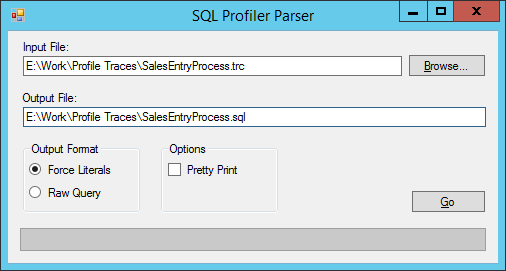
What I did is analyze a good amount of these profile trace (*.trc) files and wrote a program that parses a *.trc file and converts it to a text file that replaces all parameters with the real values so it is easier to determine what your result set REALLY is. The link is below:

SQL Trace File Parser

It isn't perfect but I did my best. It then uses a web service I found to format (indent/line break) the queries and writes them out to the text file (that also isn't perfect either, you might get really long one liners, sorry).

How to Use
  1. First, we need to open SQL Profiler. Easy enough.
  2. We'll need to create a Template in the File->Templates->'New Template...' menu.

    • Give your template a name, I named mine DAX_TRACE
    • Click on the Events Selection tab
    • SQL Profiler will trace everything that is thrown at it so we need to filter it to specific only trace events fired by DAX.  Make sure that both the checkboxes ('Show all events' and 'Show all columns') are checked and click on 'Column Filters...' and filter the two columns
      • Application Name = "Microsoft Dynamics AX" (no quotes)
      • Database Name = <The Database your DAX environment uses>

      You may choose additional filters as you see fit.
    • Now we will need to select events and columns we will be tracing
    • You may select any/all events/columns you wish but you need at least the following events:
      • RPC:Starting
      • SP:StmtCompleted
      • SQL:StmtCompleted
      And the following columns:
      • TextData
      • SPID
      • ObjectName
      Note: A quick way to save time when deselecting columns is to right-click the column header and choose 'Deselect Column'.
    • 'Save' the template
  3. Now we are set up and can trace with this same template anytime we wish.
  4. Let's begin tracing by clicking on the 'New Trace' button.  It'll ask you to connect to a SQL Server. Enter the SQL Server information and make sure it successfully makes a connection.
  5. A new window opens to provide you with options as to how you wish to trace the server.  You can give the trace a name, it doesn't matter if you leave it.  You should then select the template in which we just created in the 'Use the template' drop-down list.  Nothing additional is needed, we can worry about saving the trace file after it runs, it's not necessary to tell it where to save ahead of time.
  6. When you are ready and you have a DAX client up and ready to trace, click 'Run' and it will begin tracing.
  7. Perform the tasks you want in the DAX client.
  8. When desired, you may stop the trace by hitting the 'Stop' button.
  9. Save this as a Trace file by clicking File->'Save As'->'Trace File...' and find a place to store the file.
  10. Open SQL Trace File Parser (download from above) and browse for the file we just traced.
  11. By default, the text file will save in the same directory/filename as the trace file but with a *.sql extension instead.
  12. The Output Format is defaulted to 'Force Literals' which simulates what the query would look like if you use the forceliterals keyword in your query (replaces the parameters with real values).  'Raw Query' will just give you the original parameterized query.
  13. The Options show Pretty Print, which uses a 3rd party web service to format the SQL with proper indentation for easy readability.  If this service is unavailable and it fails, please uncheck it.
  14. Click Go and watch it churn away.
  15. Open the *.sql file and look at the beautiful SQL it found.
  16. As usual, if you spot any bugs please send message me and provide the *.trc file if possible.
I'm always open to comments and suggestions to improve this.  Let me know.

Change Log:
2014-12-10 - Feature - Changed the default output filename to a *.sql instead of *.txt
2014-12-10 - Feature - Added the option to use or not use a 3rd party web service to format the SQL

Monday, June 20, 2011

Accessing Dynamics AX Containers from SQL

If anyone has dealt with storing container objects in the database, you also know of how impossible it is to access it's contents from outside of DAX.  I spent a couple of days reverse engineering the binary format of containers and how it stores information.  From that, I have developed a couple of SQL functions that allow you to dig into these containers from wherever you need to (SSRS, Management Studio, etc.).

There are two functions:

  • CONPEEK(varbinary, int)
  • CONSIZE(image)

CONPEEK acts exactly as DAX handles it so it should be no mystery.  CONSIZE is used within the CONPEEK function to handle nested containers, it will just give you the size in bytes of the container (Not to be confused with conlen() in DAX).

Note: Sorry, you must CAST the return value of CONPEEK as a varbinary(8000) before calling back into CONPEEK when dealing with nested containers. I could not find a way around it.

Usage:
DECLARE @con AS varbinary(8000);
-- An example container with structure:
-- * 2 (int)
-- * (container)
--    * 17 (int)
--    * 'abc' (str)
SET @con = 0x07FD01020000000707FD0111000000006100620063000000FFFF;

SELECT CONPEEK(@con, 1); --returns 2
SELECT CONPEEK(@con, 2); --returns a container (0x07FD0111000000006100620063000000FF)

SELECT CONPEEK(CAST(CONPEEK(@con, 2) AS varbinary(8000)), 1); --returns 17
SELECT CONPEEK(CAST(CONPEEK(@con, 2) AS varbinary(8000)), 2); --returns 'abc'

Downloads:
Changelog:
  • 2011-11-21 - Bug - Strings were limiting to 30 characters, this is fixed
  • 2012-11-15 - Feature - Added ability to read utcDateTime elements
  • 2013-11-27 - Feature - Added ability to read EnumLabel elements
  • 2014-04-02 - Bug - Fixed DateTime bug...Workaround added for unknown 0x31 type
  • 2014-06-07 - Bug - Fixed Enum bug, int to string conversion error
  • 2014-06-09 - Bug - Fixed DateTime bug, wrong parameter was referenced
  • 2014-08-27 - Feature - Added ability to read Int64 elements
  • 2014-12-10 - Bug - Fixed DateTime bug, conversion issue from string to datetime is fixed
  • 2015-12-10 - Feature - Added ability to read BLOB elements
  • 2015-12-10 - Bug - Fixed Enum bug, returns enum int value instead of 0 or 1